Working Off Distorted Artwork
Published 24 Mar 2022 · 6 min
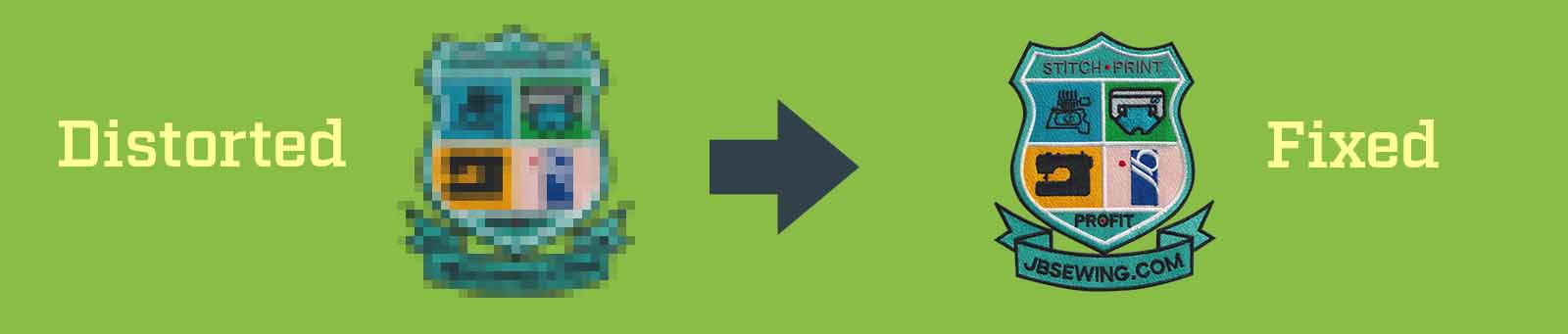
Customers don't always have access to 100% perfect camera-ready files. Sometimes, the image quality just isn't great! Areas of the artwork are pixelated and you still have to find a workaround. When working with a photograph, we have to convert (and sometimes recreate an artwork mockup) the file into vector artwork.
Let's discuss this in this artwork blog.
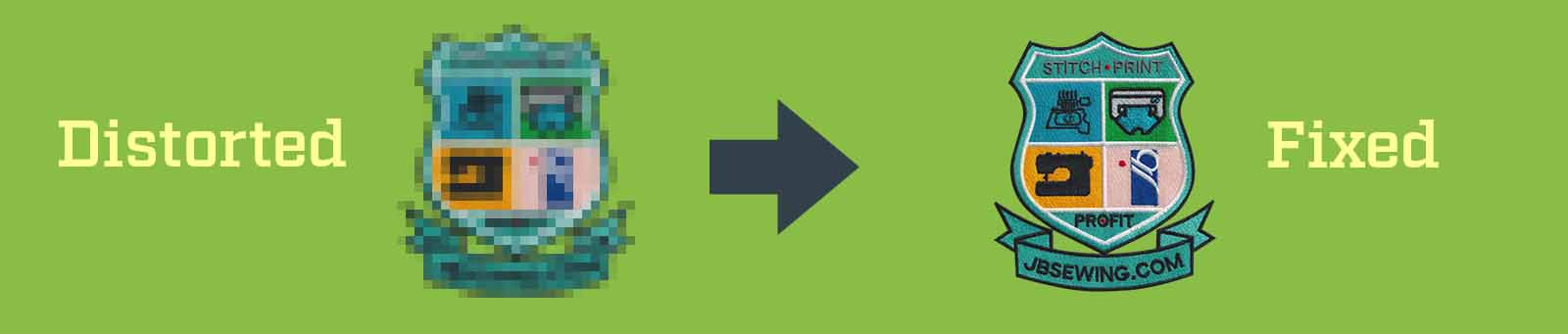
If there's a smudge or illegible text, the process of vector artwork creation gets more tedious and time-consuming for both parties. We do not expect a crisp HQ image but it does get tough to work with low-quality scans/screenshots!
The problem images generally include:
- Wavy scans or photographs of a logo.
- Low-resolution images with barely visible art.
- Designs where the essence of the original logo needs to be retained but with the use of new text.
In such a situation, valuable time can be spent going back and forth, trying to "mend" the original file and getting repeated approvals at each step. Worse still, expensive samples and, at times, small production may go to waste if the artwork is not corrected.
So, here are the three possible solutions:
Go back to the customer and demand a better image. In most cases, the customers can find a better file, and so that's the problem solved!
Google the logo and do an image search; We cannot tell you how many people save the thumbnail instead of right-clicking the image and opening the image in a new window -- as the thumbnail is always a lower resolution.
If all this fails, order a new artwork -- If we get the correct brief with all the information, our team can help by creating a "corrected" artwork mockup for approval. Nothing will be finalised without your approval.

Ready to get started?
Free quote and digital mockup included.
Or call us on 0800 368 7414